Classic 1984 — design system
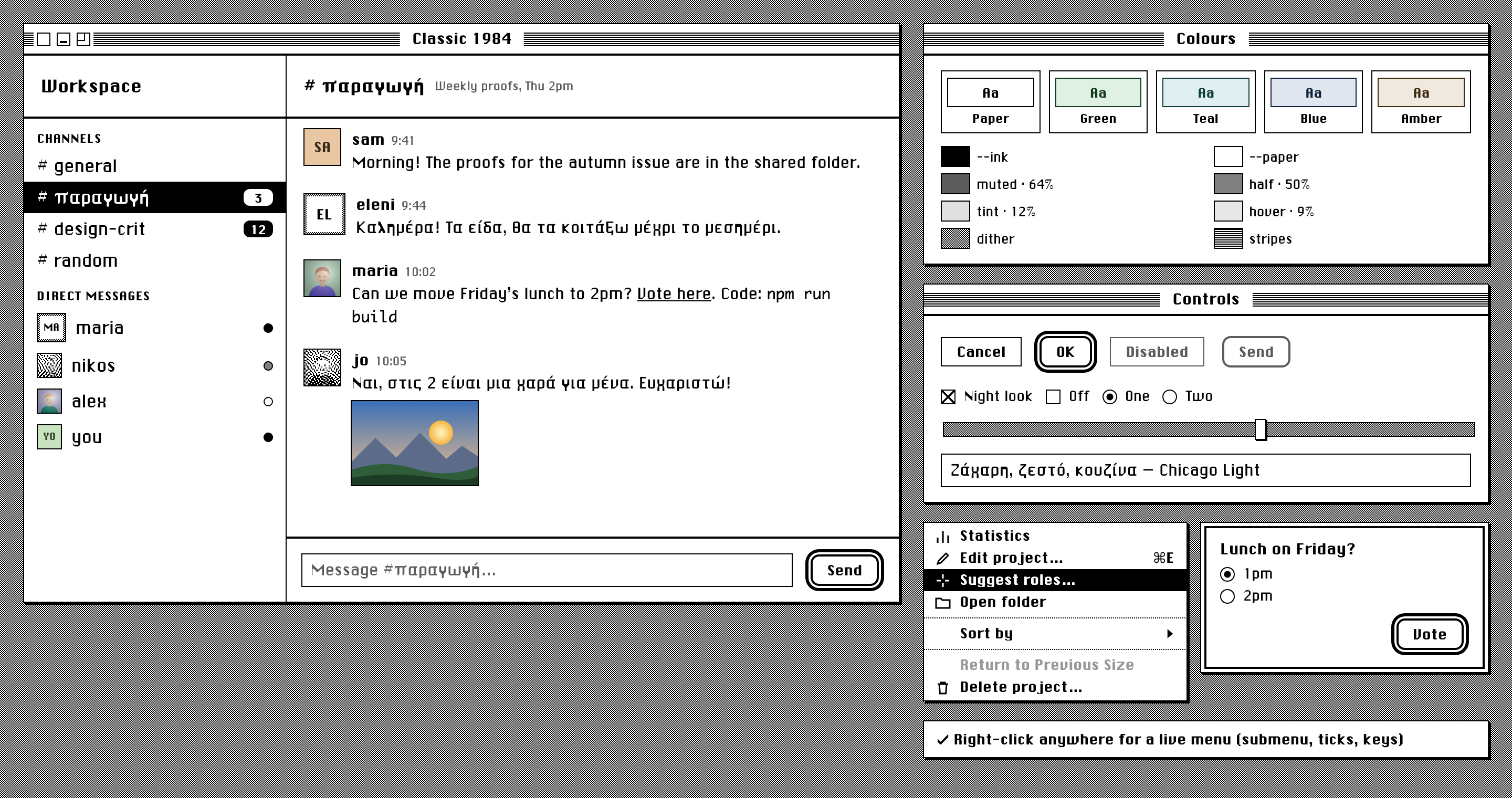
The look of the 1984 Macintosh, rebuilt for modern apps. It started in Agentrix (Classic theme, renderer/classic.css and ios/AgentDeck/Classic.swift). Ekybe then took it further: the Mac window chrome, people's pictures, Greek text, per-device settings and a text size setting. This repository is the reference for copying it into any other app: the rules, a drop-in stylesheet and script, the fonts with full Greek, and a live example.
Live: justaicode.app/classic-1984 · example page · picture styles
| Status | Live in Ekybe (web, Mac, iPhone, Android) and Agentrix (Mac, iPhone), October 2026 |
| Approved by | Roberto, from mockups, 3 and 4 Oct 2026 |
| Reference implementations | Ekybe (src/classic.css, src/lib/classic.ts, src/components/ClassicTitleBar.tsx, src/components/Avatar.tsx) and Agentrix (renderer/classic.css, ios/AgentDeck/Classic.swift); both private |
| This repository | classic-1984.css, classic-1984.js, fonts/, specimen.html, pictures.html, tools/, images/ |
| Licence | Code and documentation MIT; fonts public domain (see LICENSE and §17) |
Contents
- Principles
- Quick start
- Colour
- Patterns
- Typography
- Shape, lines and elevation
- Layout and metrics
- Components
- People's pictures
- Interaction and motion
- Settings a person can change
- Platforms
- Re-skinning an existing app
- Accessibility
- Do and don't
- Checklist
- Fonts: origin, licence, rebuilding
- Decision log
- Files
1. Principles
The 1984 Mac had a 1-bit screen, 512 × 342 pixels, black or white per pixel. Everything in this system follows from that limit. It is applied with judgement, not literally.
- Two colours. There is an ink and a paper, and nothing else. By default they are black and white. A person may tint them (dark green on pale green, for example), but there are still only two. Every grey, highlight and border is the ink, the paper, or a mix of them.
- Grey is a pattern. Where a modern UI uses a grey fill, 1984 used a dither: alternating ink and paper pixels. Use the dither for tracks, the desktop and frames, never a flat grey fill. Text that has to be secondary is the one exception: it uses a 64% ink mix, because dithered text cannot be read.
- Square corners, hard shadows. Corners are square. Shadows are a solid 2px step down and to the right, with no blur. The few round things are listed in §6 and are deliberate.
- Lines are 1px. The line under a title is 2px. That is the whole hierarchy of lines.
- Selection is reversal. A chosen row, a hovered menu item, a pressed button all swap ink and paper. Nothing gets a colour to show it is selected.
- Chicago speaks. Names, titles, buttons, menus and labels are set in Chicago. Running text is set in Chicago Light, a thinned Chicago that can be read for long stretches.
- Colour is content, never chrome. Emoji, photos and pictures people post keep their colour. The interface never adds any.
- No motion. Things appear and disappear. Nothing fades, slides or bounces.
- Modern where it matters. Text can be resized, Greek is fully supported, and the night look follows the system's dark mode. Focus is visible. Authenticity never outranks reading.
2. Quick start
Copy
classic-1984.css,classic-1984.jsandfonts/into your app, or add this repository as a git submodule:git submodule add https://github.com/justaicode/classic-1984.git design/classic-1984Keep the relative path
fonts/next to the CSS, or edit the two@font-faceURLs.Add
class="c84"to<html>. Any container works too, if only part of the app should be in the style.Set the colours:
import { followSystem } from './classic-1984.js'
// prefs: { hue, strength, night, avatars } — see §3 and §11
const stop = followSystem(document.documentElement, () => prefs)
If you skip this step, the CSS defaults are black on white, day only.
Build with the
c84-*classes in §8. Openspecimen.htmlto see every one of them. Serve the folder (python3 -m http.serverin it), because fonts and 1-bit photos need same-origin.Ask questions and show menus through the kit, never the browser's own
confirm()/alert()/ context menu:import { showMenu, showDialog, showPrompt } from './classic-1984.js' const id = await showMenu(items, { x: e.clientX, y: e.clientY }) // §8.7 const n = await showDialog({ message, detail, buttons: ['Delete', 'Cancel'], destructive: 0 }) // §8.8 const text = await showPrompt({ message: 'Rename', value, confirm: 'Rename' })
A bare window:
<div class="c84-window">
  <div class="c84-window-bar">
    <button class="c84-box is-close" aria-label="Close"></button>
    <button class="c84-box is-mini" aria-label="Minimise"></button>
    <button class="c84-box is-zoom" aria-label="Zoom"></button>
    <span class="c84-window-title">Untitled</span>
  </div>
  <div class="c84-pane-bar is-plain">Inbox</div>
  <div class="c84-row is-selected">First item <span class="c84-badge">3</span></div>
  <div class="c84-row">Second item</div>
</div>
3. Colour
3.1 The two colours
| Token | Meaning |
|---|---|
--ink |
Text, lines, fills that mean "on", the selected row's background |
--paper |
Backgrounds, text on an ink fill, the inside of boxes |
Everything else in the system is derived from these two.
3.2 Derived tokens
| Token | Value | Used for |
|---|---|---|
--c84-muted |
64% ink in paper | Timestamps, hints, placeholders, disabled labels |
--c84-half |
50% ink in paper | The "away" presence dot |
--c84-tint |
12% ink in paper | A soft accent fill (a mention, a highlighted message) |
--c84-hover |
9% ink in paper | A row under the pointer |
--c84-dither |
2 × 2 checkerboard of ink and paper | Grey surfaces: desktop, slider track, scroll track, picture frame |
--c84-stripes |
1px ink / 1px paper horizontal lines | Title bars |
--c84-dots-h |
1px ink / 1px gap, horizontal | Dotted rule between menu groups |
The mixes use color-mix(in srgb, …). They are the only "greys" allowed, and only where a pattern cannot work: text, and one-pixel dots.
3.3 Tinting: the recipe
A person picks a hue (0–359) and a strength (0–100). Strength 0 is plain black and white whatever the hue. The recipe below is identical in Ekybe, Agentrix and classic-1984.js. Keep it identical, or the apps stop matching.
k = strength / 100

Day:   paper = hsl(hue, 35k%, (100 − 9k)%)     ink = hsl(hue, 60k%, 15k%)
Night: paper = hsl(hue, 45k%, 6k%)             ink = hsl(hue, 80k%, (100 − 32k)%)
Values are rounded to one decimal place.
3.4 Presets
The settings offer five swatches. Picking one sets the hue, and sets the strength to 100 if it was 0 (Paper sets strength 0).
| Preset | Hue | Day ink | Day paper | Night ink | Night paper |
|---|---|---|---|---|---|
| Paper (default) | — | hsl(0 0% 0%) #000 |
hsl(0 0% 100%) #fff |
hsl(0 0% 100%) #fff |
hsl(0 0% 0%) #000 |
| Green | 135 | hsl(135 60% 15%) |
hsl(135 35% 91%) |
hsl(135 80% 68%) |
hsl(135 45% 6%) |
| Teal | 180 | hsl(180 60% 15%) |
hsl(180 35% 91%) |
hsl(180 80% 68%) |
hsl(180 45% 6%) |
| Blue | 215 | hsl(215 60% 15%) |
hsl(215 35% 91%) |
hsl(215 80% 68%) |
hsl(215 45% 6%) |
| Amber | 35 | hsl(35 60% 15%) |
hsl(35 35% 91%) |
hsl(35 80% 68%) |
hsl(35 45% 6%) |
Below the swatches, a hue slider (with a rainbow track) and a strength slider ("From plain black and white to fully tinted") allow any value in between.
| Green, day | Blue, night |
|---|---|
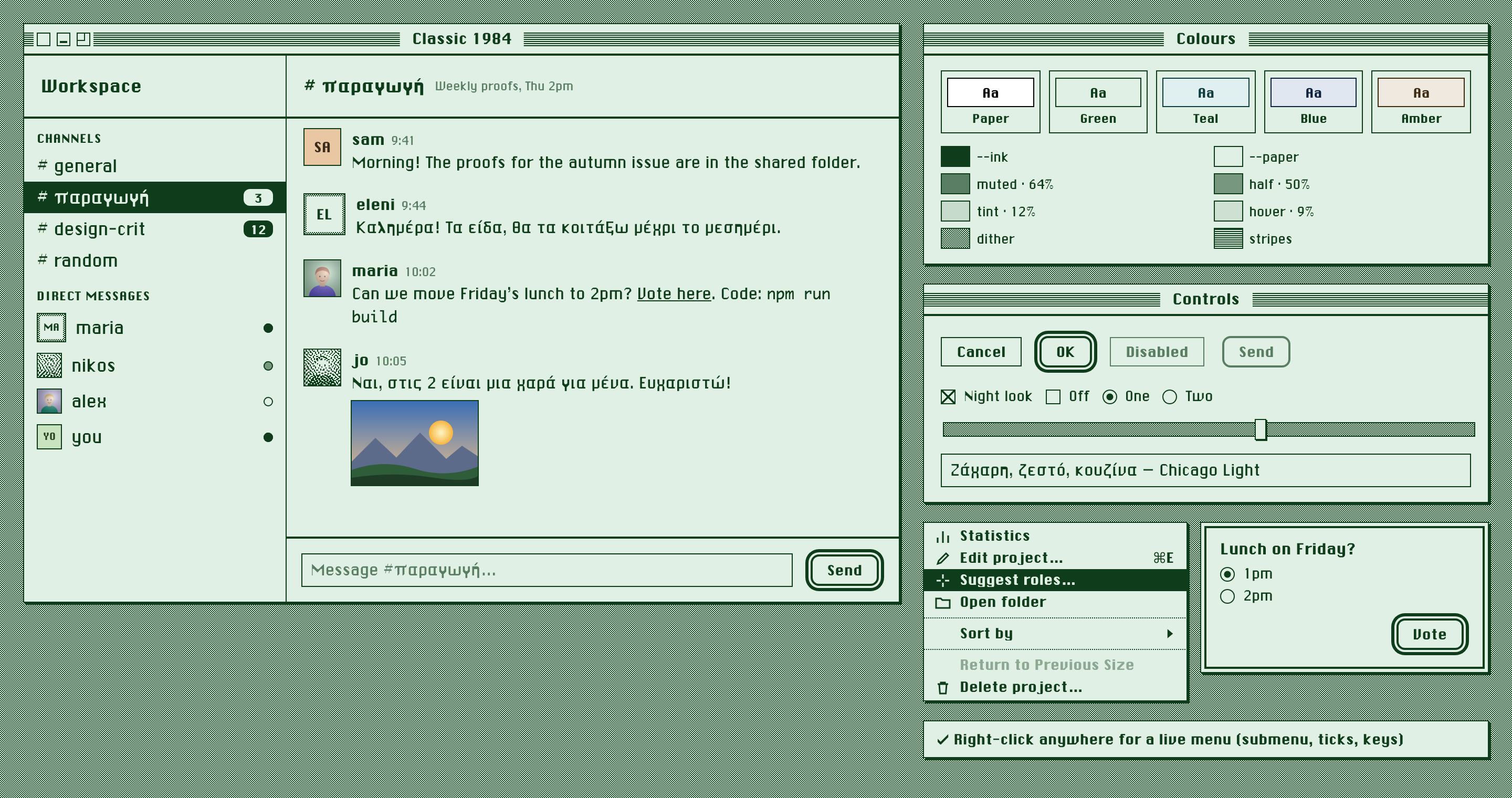 |
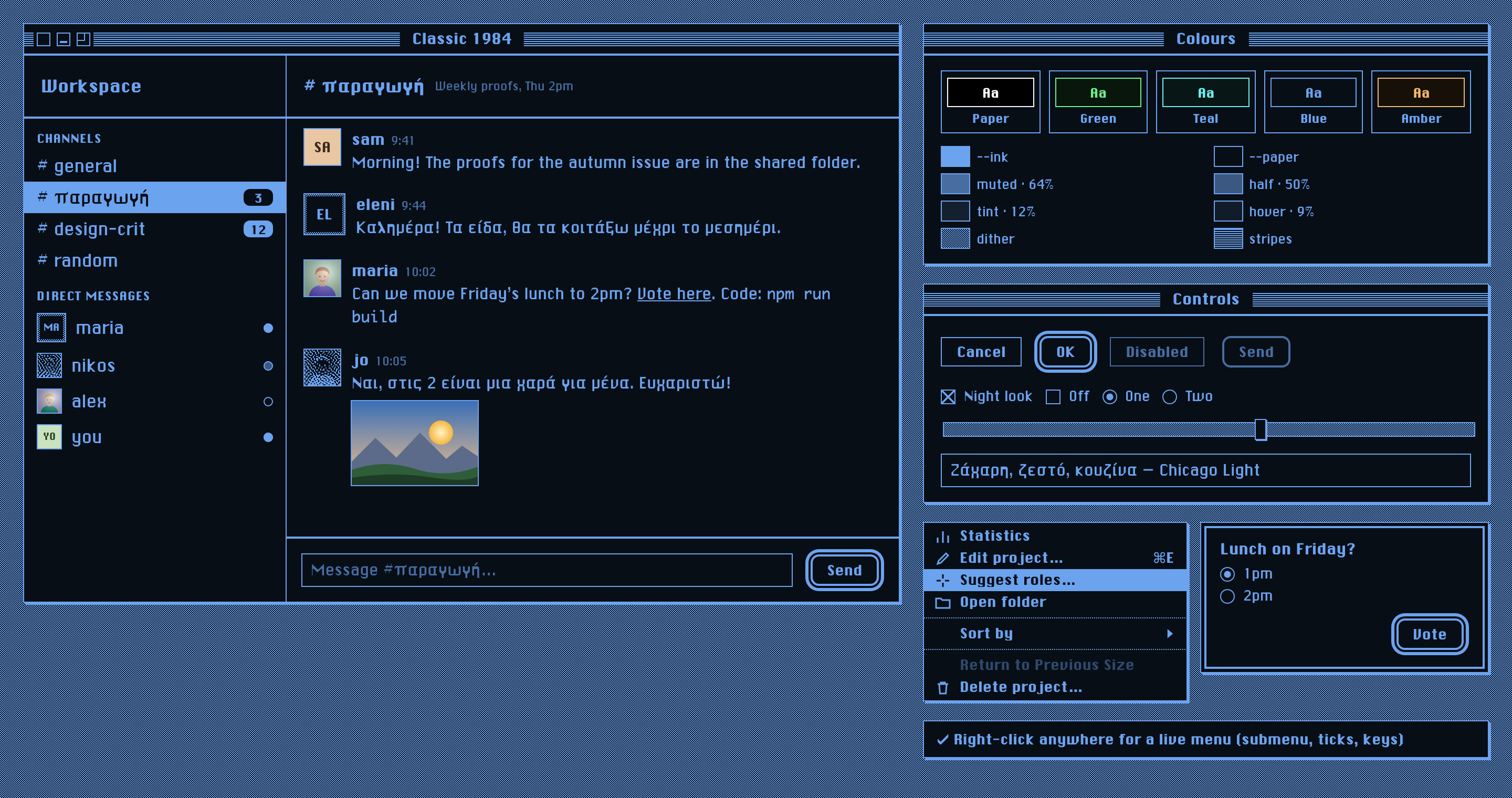 |
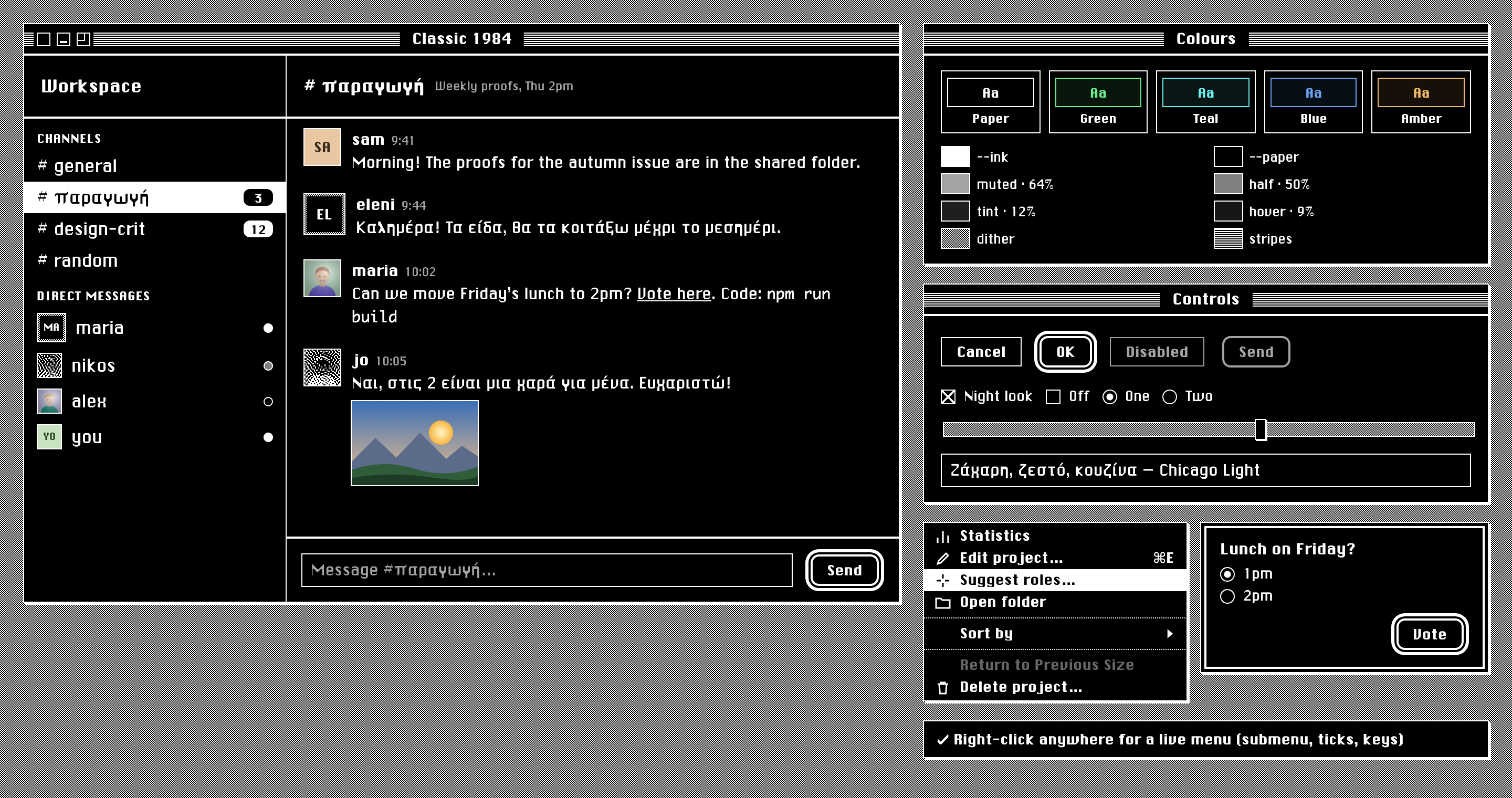
3.5 Night
The night look is glowing ink on dark paper, like a phosphor screen. It applies only when both are true:
- the person allows it (
night: true, the default), and - the system is in dark mode (
prefers-color-scheme: dark).
At night the root gets data-c84-night and color-scheme: dark, so native controls and scroll bars follow. Night is the same recipe with the night formula. Nothing else changes: no component has a separate night rule.
3.6 Colour that is allowed through
Only content keeps its own colour:
- emoji
- photos and images people post
- "Real photos" avatars
- "Colour tiles" avatars (§9)
- file-type icons in attachments
The interface itself never adds a colour: no red for errors, no green for success, no blue for links. Errors are ink text, and links are ink with an underline.
White text in an existing app. If the app writes color: #fff for "text on the accent", re-map that to --paper. The accent is now the ink, which is near-white at night, so white-on-ink would vanish. Ekybe does this with one rule; see §13.
4. Patterns
All patterns are CSS gradients sized in whole pixels, so they stay crisp at 1x and 2x.
--c84-dither:  repeating-conic-gradient(var(--ink) 0 25%, var(--paper) 0 50%) 0 0 / 2px 2px;
--c84-stripes: repeating-linear-gradient(var(--ink) 0 1px, var(--paper) 1px 2px);
--c84-dots-h:  repeating-linear-gradient(90deg, var(--ink) 0 1px, transparent 1px 2px);
| Pattern | Where |
|---|---|
| Dither (50% grey) | Desktop behind windows, slider track, scroll-bar track, the 3px frame of an "Ink only" picture |
| Stripes | The window title bar (between 7px paper margins); a 9px band along the top of pane headers |
| Dotted rule | Between groups in a pull-down menu |
Never use a pattern behind text.
5. Typography
5.1 Faces
| Role | Family | File | Notes |
|---|---|---|---|
| Display: names, titles, buttons, menus, labels, badges | 'Chicago' |
fonts/ChicagoGreek.ttf |
ChicagoFLF plus the Greek it lacked (§17). One weight only. |
| Text: messages, body, fields | 'Chicago Light' |
fonts/ChicagoLight.ttf |
Chicago with upright strokes thinned for reading. Identical Latin to Agentrix's iPhone chat font. |
| Text, optional | 'Geneva' |
fonts/Geneva.ttf |
A 1992 copy of Geneva (PostScript GenevaPlain), Latin only, wide word spaces. An extra choice for chat text in Agentrix's iPhone app; see fonts/README.Geneva. |
| Code | Monaco → ui-monospace, Menlo, monospace |
system | Monaco is on every Mac; elsewhere the fallback is fine. |
Fallback after both Chicagos: -apple-system, 'Helvetica Neue', sans-serif. With the bundled files, the fallback should only ever be reached for scripts the fonts don't cover (Cyrillic, CJK, and so on).
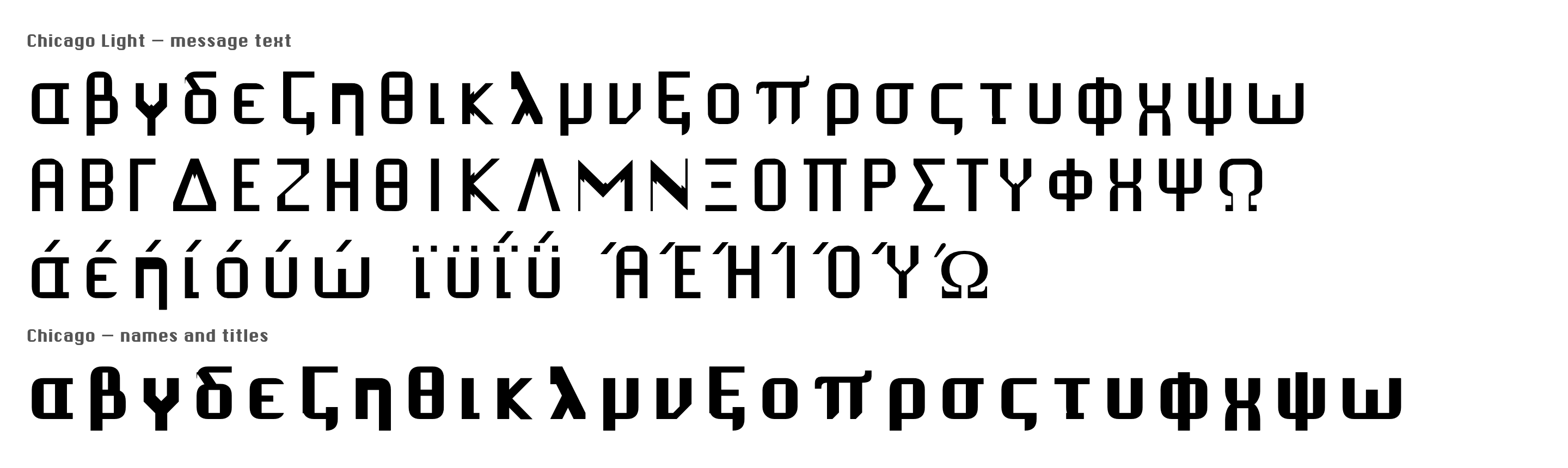
Ship the fonts. Do not rely on system fonts for this look. Geneva exists only on a Mac, and only as a smooth modern redraw, and phones have neither font. Before Oct 2026 Ekybe's body text was "Geneva" and looked modern everywhere. Bundling the two TTFs fixed that.
One weight. Chicago has a single weight. Always set font-weight: normal on Chicago text, and font-synthesis: none where available: a browser-synthesised bold smears the pixel shapes. Emphasis is the face (Chicago against Chicago Light), not weight.
5.2 Scale
Sizes from Ekybe's type tokens (--fs-* in its index.css). The section label, menu and button sizes are this kit's. Line heights are unitless, so they follow the text size setting.
| Role | Face | Size | Line height |
|---|---|---|---|
| Window title | Chicago | 14px | 20px |
| Pane title (channel name) | Chicago | 19px | — |
| Workspace name | Chicago | 18px | — |
| Author name | Chicago | 15px | — |
| Body / message | Chicago Light | 14.5px × text scale | 1.55 |
| Navigation row | Chicago Light | 13.5px | — |
| Menu item | Chicago | 13px | 18px |
| Button | Chicago | 13px | 18px |
| Section label (CHANNELS) | Chicago | 11px, letter-spacing 0.5px, upper case | — |
| Meta: time, hint | Chicago Light | 11px, muted | — |
| Badge | Chicago | 11px | 1 |
5.3 Pixel crispness
Chicago is drawn on a 12-pixel em: one 1984 pixel is 1/12 of the font size. It is sharpest at 12, 18 and 24px, but every size from 11 up reads well on a 2x screen. Don't fight the anti-aliasing; turning it off makes Chicago Light uneven.
5.4 Greek
Ekybe's team writes a quarter of its messages in Greek, so Greek is first-class. Both faces cover the full monotonic Greek alphabet in Chicago's own grid: lower case, capitals, tonos, dialytika, final sigma, and ano teleia. Polytonic Greek is not covered and falls back. See §17 to extend coverage to another script.
6. Shape, lines and elevation
6.1 Corners
Everything is square (border-radius: 0). The exceptions, which are what 1984 itself made round:
| Thing | Radius |
|---|---|
| Presence dot | 50% (circle) |
| Radio button | 50% |
| Default button (§8.5) | 8px |
| Unread badge | 6px |
6.2 Lines
| Line | Width | Colour |
|---|---|---|
| Border of any box, field, button, row divider | 1px | ink |
| Rule under a window title bar or a pane header | 2px | ink |
| Rule above the composer / a footer bar | 2px | ink |
| Rule between menu groups | 1px dotted | ink |
| Separator between two panes side by side | 1px (1pt on a phone), full height; on a phone it melts into the status bar's blur, sharp from below it | ink |
| Disabled outline | 1px (2px on the default button) | muted |
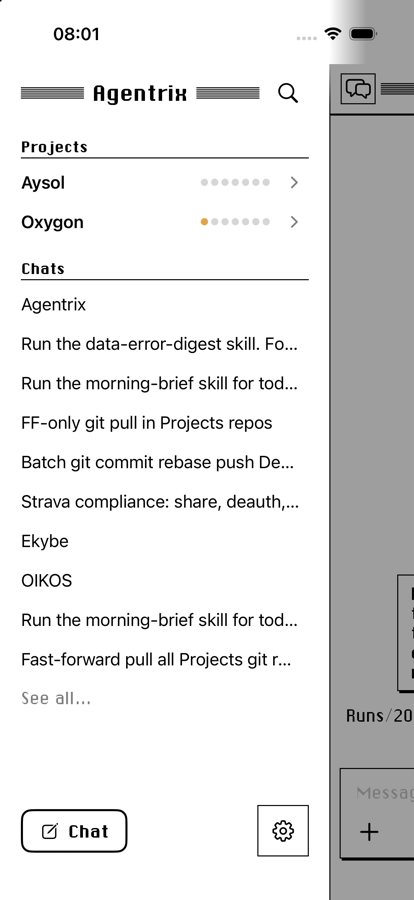
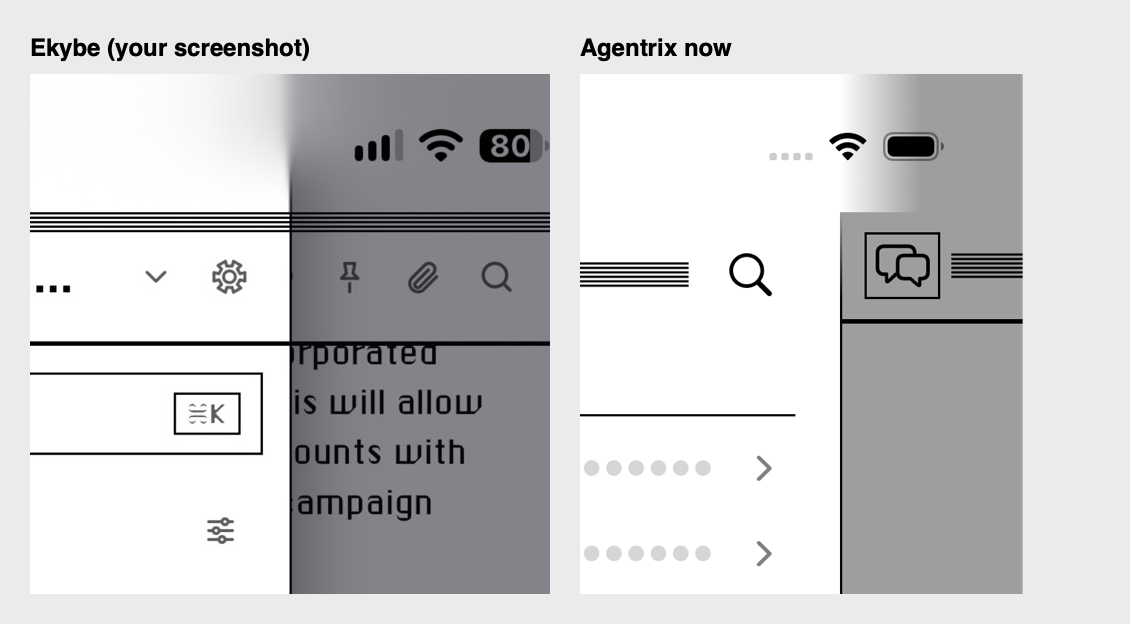
Panes side by side are parted by one thin ink line running their full height: no shadow under it, no dither gutter, no thick edge. On a phone the line never runs sharp through the status bar. A drawer (284pt wide) dims the conversation with rgba(10,8,20,.5) and casts one soft shadow on it (8px 0 28px rgba(0,0,0,.3)). Under the status bar iOS blurs a web view's content, strongly in the top third and fading to sharp at the bottom, so the edge between drawer and dimmed conversation goes soft at the top and the line melts away before the clock and Wi-Fi. A native app has to draw that blur itself (Agentrix's iPhone app does it row by row: a 4pt core inside a 24pt blur). A straight fade looks wrong. The drawer's header is the same height as the conversation's title bar, so their rules run straight across the edge. Drawn up through the status bar, the line or a hard dimming edge looked broken (Roberto, 5 Oct 2026). This is how Ekybe draws its sidebar against the conversation, and Roberto preferred it to Agentrix's iPhone drawer, which had a 3pt edge starting under the status bar plus a hard shadow (4 Oct 2026). A pane that can be dragged wider keeps the same line; the drag target is an invisible strip a few pixels either side of it.
6.3 Elevation
There are two shadows, both solid and unblurred:
--c84-shadow: 2px 2px 0 var(--ink)for windows, menus, dialogs and notices: anything that floats.--c84-shadow-sm: 1px 1px 0 var(--ink)for small raised things: the slider thumb.
Nothing has a blurred shadow, a glow, or a translucent overlay. A modal backdrop is the dither, or nothing.
7. Layout and metrics
| Metric | Value | Why |
|---|---|---|
| Window title bar | 28px | The Mac app's own bar (§8.1) |
| Pane header | 60px exactly, box-sizing: border-box, no vertical padding |
All pane headers share one height so their 2px rules meet in a single line across the window. Ekybe's sidebar header came out 62px against the channel header's 60, and the two rules visibly missed (Roberto: "why these two lines are misaligned"). |
| Stripe band in a pane header | 9px at the top | Dropped when the pane is directly under a window bar (stripes on stripes) |
| Gap above the search field under a header | 12px | Other themes have no rule there; here the field would sit on it |
| Row padding | 5px × 12px | |
| Avatar in a message | 34px | 22px in lists, 18px stacked in a thread summary |
| Scroll bar | 14px | |
| Window box (close/mini/zoom) | 13px square with a 3px paper moat | |
| Default button outer ring | 2px paper gap + 3px ink | Needs 5px of margin around it |
The spacing scale is the host app's. This system changes how things are drawn; where controls go is fixed by §7.1–7.4, in every look (Classic or not) and on every screen (Mac and phone).
7.1 Order of controls in a row
Every row of controls reads the same way, left to right:
| Place | What | Examples |
|---|---|---|
| Leading | Add things to what you're writing | + (files, photos), paperclip |
| Then | Options that change how it's sent | Autonomy (Edits only / Full auto) |
| Middle | The field, taking the free width | Message box, "Type your own answer" |
| Trailing, in this order | Status · choice of model · Queue · Stop · microphone · the primary action | Working 1:12 · Opus 5.5 High · Queue · ■ · 🎙 · ↑ / Send / Next |
Rules:
- The primary action is always last (rightmost): Send, Next, OK, the default dialog button.
- Add/attach is always first (leftmost), before the field, never after it.
- What's attached sits above the field it belongs to, each item with its own ×; pictures as thumbnails that open full screen on a tap.
- A control keeps its place when it appears or hides. Controls shown only in some states (Queue and Stop while the agent works) slot into their fixed position in the order above; nothing else moves round them.
- When the screen is too narrow, the choice of model gives way first, then status. Never the field, the add button or the primary action.
- A control that can't act right now is dimmed, not hidden (Queue with nothing typed, Send with an empty box), unless the whole state it belongs to is gone (Queue and Stop when nothing runs).
- Same words everywhere: the same label on Mac and phone ("Queue", "Next", "Send", "Type your own answer"), and the same word for the same thing across screens.
7.2 The message box
[ attached things, each with × ]
[ text, growing with what's typed                                         ]
[ + ] [autonomy]  ·····  [Working 1:12] [model ▾] [Queue] [■] [🎙] [ ↑ ]
| State | Mac | Phone |
|---|---|---|
| Idle | + · autonomy · model · Send | + · model · mic · Send |
| Agent working | + · autonomy · Working m:ss · model · Queue · Stop · Send | + · Queue · Stop · mic · Send |
While the agent works, Send interrupts it and sends now, Queue waits for its turn to end, and Stop stops it; on the Mac Return is Send and ⌥Return is Queue. Queue shows for the whole time the agent works, dimmed until there's something typed. The two differ only where the device does: the phone has a microphone, and it's too narrow for the model chip beside Queue (rule 5).
7.3 The question form
Question 2 of 4                                    ● ● ○ ○
The question, in the title face
[ picture, if the question has one ]
( ) Option one
    one short line of detail
( ) Option two
[ attached things, each with × ]
[ 📎 ] [ Type your own answer                         ] [ Next | Send ]
1. Earlier answer · 2. …                                        Back
- Header: "Question n of m" on the left, one progress mark per question on the right.
- Options: radio circles in Classic, numbers elsewhere; the detail line under the label, muted.
- The own-answer row is always open, never behind a tap, and follows §7.1: paperclip, field, then the primary action (Next, or Send on the last question).
- Answers so far and Back sit under the row.
7.4 Mac and phone are one app
- Every row has the same controls in the same order on both (§7.1). A difference needs a reason that comes from the device (no Return key, a microphone, the width) and is written in the table of that row.
- When a control is added on one platform, the other gets it in the same change, in the same place, or the difference is written down here.
- New controls take their slot from §7.1; they're never added "wherever there's room".
8. Components
Every component is in classic-1984.css and shown in specimen.html.
8.1 Window and window title bar
.c84-window · .c84-window-bar · .c84-window-title · .c84-box.is-close | .is-mini | .is-zoom
Window: paper, 1px ink border, 2px hard shadow.
Bar:
- 28px tall, with a 2px ink rule beneath.
- The background is stripes, with a 7px paper margin at the top and bottom, so the stripes form a band in the middle.
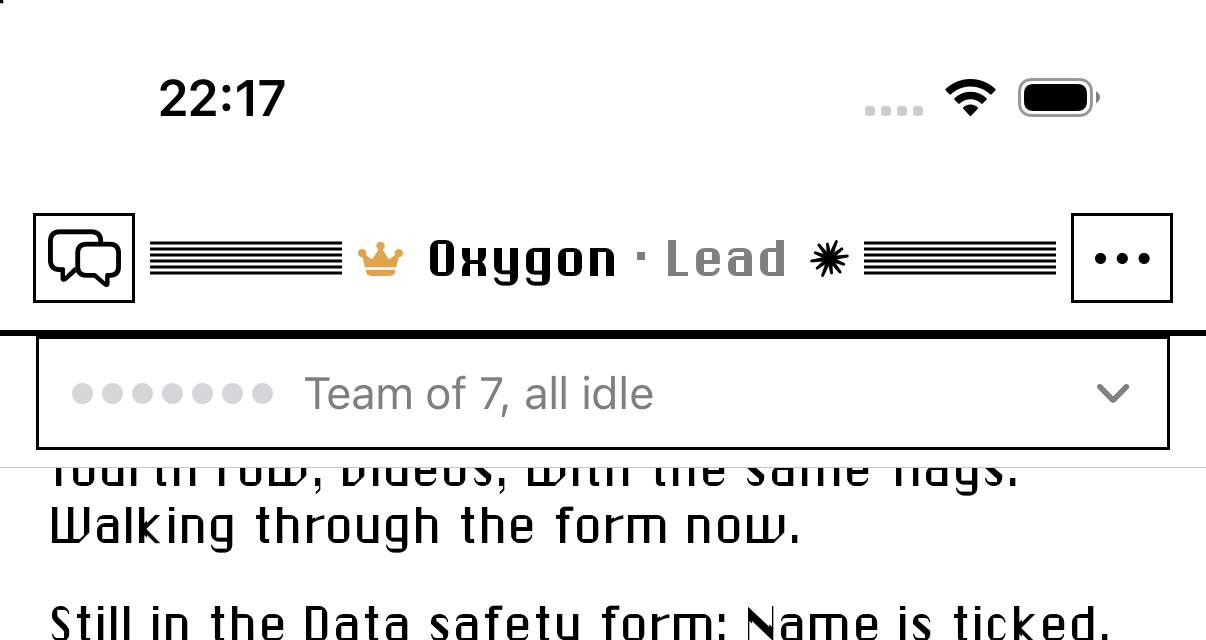
Title: Chicago 14/20, centred over the whole bar (not the space left by the boxes), on a paper box with 12px padding either side, so it cuts the stripes. On a phone the box is only as wide as the title, with 4pt either side, so the stripes run right up to it; a long title is cut short so at least 36pt of stripes stay on each side (Roberto, 5 Oct 2026).
One line only. The title is a single line: no subtitle under it. A small mark that says what the thing is (in Agentrix, the agent's logo) sits after the name, about 15pt, in ink, not in its brand colour; a status mark (a crown for a team's lead) sits before it. Anything already shown elsewhere on the screen (a folder, a path) is not repeated here.
Boxes:
- Close, minimise and zoom sit at the left: 13px paper squares with a 1px ink border.
- Each has a 3px paper outline as a moat, so the stripes stop short of it.
- Spacing between them is 2px.
- Close: an empty box. While pressed, it shows an asterisk-like star made of a horizontal, a vertical and two diagonal lines.
- Minimise: a 7 × 2px ink bar, 2px above the bottom.
- Zoom: a 7 × 7px corner bracket (top-left lines), the 1984 zoom box. While pressed it fills with ink.
The bar is a drag region (
data-tauri-drag-regionin Ekybe).Zoom box behaviour (Ekybe Mac):
- A click goes full screen; ⌥-click fills the screen.
- Resting the pointer on it for 450ms opens a pull-down menu (§8.7) with these items:
- Enter / Exit Full Screen
- (separator)
- Fill
- Center
- (separator)
- Left Half
- Right Half
- Top Half
- Bottom Half
- (separator)
- Return to Previous Size (disabled until the window has been arranged)
- The menu closes 250ms after the pointer leaves the box and the menu (moving from one to the other keeps it open), or on Escape.
- Tiles use the screen's work area, so the menu bar and Dock are excluded.
- Return to Previous Size puts back the bounds from before the first tile; tiling again from a tiled state keeps that first size.
- The window's minimum size gives way while it is tiled, so a half is a half on a laptop screen too, and comes back with Return to Previous Size. (Ekybe keeps its minimum, so its halves can be wider than half on small screens.)
- In Electron, see §12.1b: square corners make a window unable to go full screen the usual way.
The native platform bar must be removed, not hidden (§12.1).
8.2 Pane header
.c84-pane-bar (.is-plain drops the stripe band)
- 60px, 2px rule beneath, Chicago title, controls on plain paper.
- Stripe band:
- In a browser or a phone, a 9px band of stripes runs along the top.
- Under a window bar (Mac app), the band is dropped: the bar's stripes are right above it, and stripes on stripes reads as noise. The window bar's rule and the header's rule are then the only dividers.
8.3 List rows and selection
.c84-row · .is-selected
- Normal: ink on paper. Hover:
--c84-hover. - Selected:
- The row and everything inside it is reversed: ink background, paper text, paper icons.
- Inside a selected row, the unread badge reverses back (paper pill, ink number), and presence dots get a paper ring.
- "Ink only" avatars keep a transparent background with ink initials, so they stay legible.
8.4 Badge and presence
- Unread badge (
.c84-badge):- an ink pill with a 6px radius, Chicago 11px paper numerals
- minimum 18 × 16px, 5px horizontal padding
- Presence (
.c84-dot): 9px circles with a 1px ink inset ring.- Active: filled ink.
- Away: filled 50% mix.
- Offline: paper with only the ring.
8.5 Buttons
.c84-button · .is-default · :disabled
| State | Look |
|---|---|
| Normal | Paper, 1px ink border, square corners, Chicago 13/18, padding 4px 14px |
| Hover and pressed | Reversed: ink fill, paper label |
| Default (what Return does: Send, OK) | 2px ink border, 8px radius, plus the outer ring: box-shadow: 0 0 0 2px var(--paper), 0 0 0 5px var(--ink). Leave 5px of margin for the ring. |
| Disabled | Muted label and muted border on paper. The default button loses its ring but keeps its rounded 2px border, so it still reads as "the button that will send". Ekybe's Send button with an empty composer is exactly this. |
Icon buttons (attach, emoji, microphone) stay as the host app draws them, in ink. A pressed or "on" icon button is reversed.
8.6 Fields and controls
- Text field / textarea (
.c84-field):- paper, 1px ink border, square
- Chicago Light at the body size × text scale
- placeholder in muted
- Checkbox:
- a 14px paper square with a 1px ink border
- checked is an X from corner to corner (1984's check), not a tick
- Radio: a 14px circle with a 1px ink border. Checked has a 6px ink dot.
- Slider:
- a 12px track with a 1px ink border and a dithered fill
- thumb: 11 × 20px paper, 1px ink border, 1px hard shadow
- Select / native pickers:
accent-color: var(--ink). Let the platform draw them; withcolor-schemeset they follow day and night.
8.7 Menus: pull-down, context menu, submenu
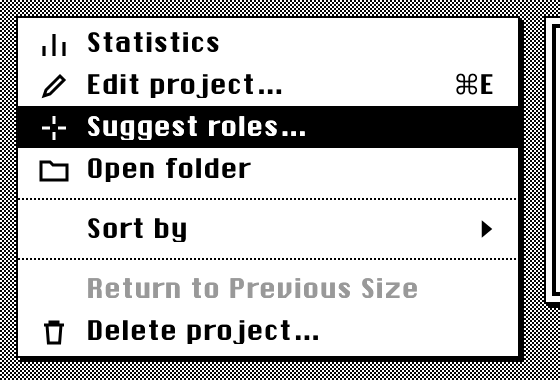
.c84-menu · .c84-menu-item (.is-on, [aria-disabled]) · .c84-menu-icon · .c84-menu-check · .c84-menu-label · .c84-menu-key · .c84-menu-cap · .c84-menu-sub · .c84-menu-sep · .c84-menu-head · .c84-menu-seg — built and run by showMenu() in classic-1984.js.
Approved 4 Oct 2026 in Agentrix as version B: pure 1984, but the app's line icons are kept.
| Part | Spec |
|---|---|
| Box | Paper, 1px ink border, 2px hard shadow, 2px vertical padding, min 180px, max 340px wide |
| Type | Chicago 13px, line height 1 |
| Row | 27px tall, padding 0 14px 0 12px, 10px between columns, no wrapping (21px read as cramped; Roberto, 5 Oct 2026) |
| Columns, left to right | Tick (11px, only if the menu has a checkable item) · icon (16 × 14px, only if any item has one) · label (ellipsis when too long) · shortcut (right, 18px gap) · submenu arrow (a solid right-pointing triangle, 14px gap) |
| Icons | Line icons used as a mask, so they draw in the row's colour and reverse with it. A row without an icon keeps the empty column, so labels stay in line. |
| Tick | A square-capped check, 11px |
| Under the pointer | Reversed: ink row, paper text and icon |
| Disabled | 40% ink: dimmer than muted text, never hidden |
| Separator | 1px dotted rule, 5px above and below |
| Group heading | Chicago 11px, muted, padding 6px 14px 3px 12px |
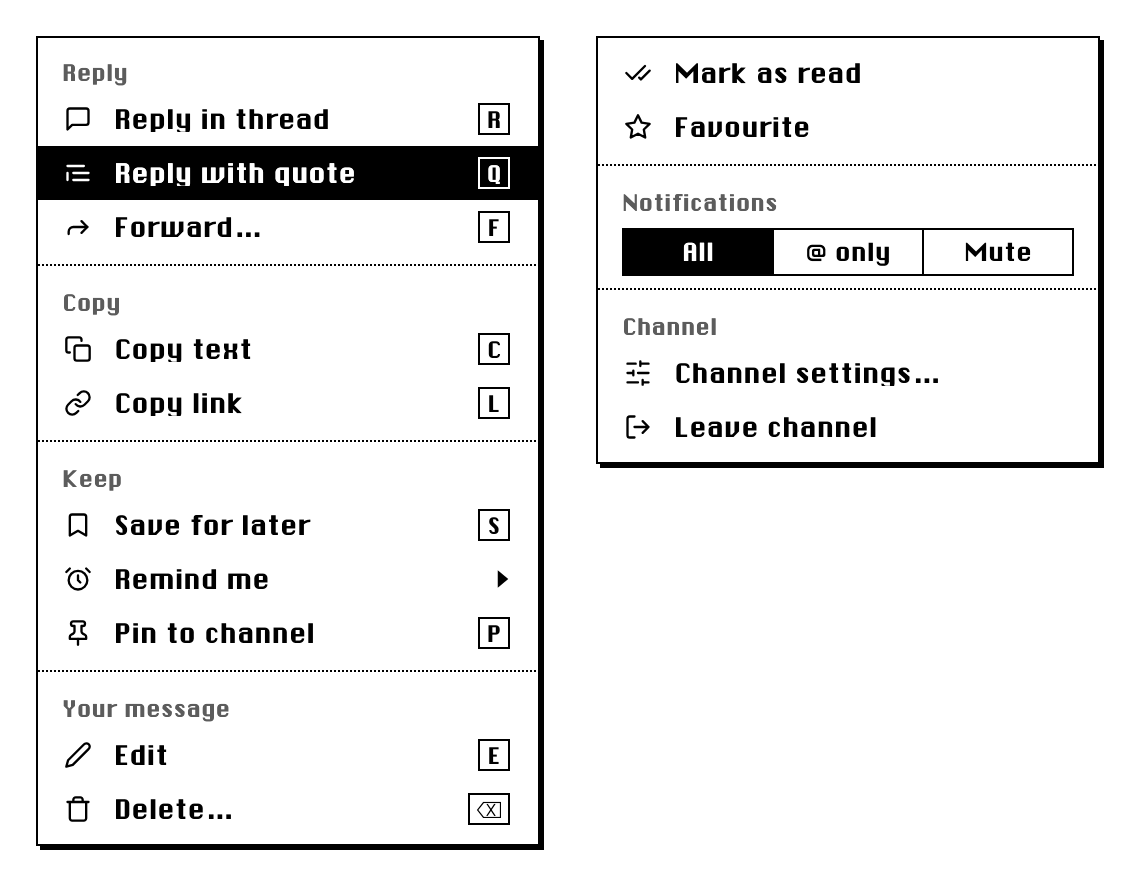
| Letter key | .c84-menu-cap: the letter in a 1px box like a key cap, Chicago 11px, 16px wide at least, 18px from the label; it reverses with the row |
| Switch | .c84-menu-seg: a choice of one inside a menu (a notification level), boxed cells in a row, the chosen one reversed |
Groups and letter keys (Ekybe, approved 8 Oct 2026). A menu longer than a handful of rows is split into groups by what the rows do:
- Each group gets a heading and a dotted rule above it, as in the message menu below: Reply (in thread, with quote, forward) · Copy (text, link, download) · Keep (save, remind, pin) · Your message (edit, delete).
- A group with nothing in it this time is left out with its heading and rule, so there are never two rules in a row or a heading over nothing.
- A short menu needs no headings: two or three rows, then rules only where the kind of action changes.
- A row can carry a letter. While the menu is open, pressing it runs the row (
letteron ashowMenu()item). Use plain letters, never ⌘ ones: ⌘Q, ⌘R and ⌘C already quit, reload and copy in a desktop app. Show the letters only where there is a keyboard. Delete takes ⌫ (Backspace or Delete). keystays for a real shortcut the app handles itself (⌘E); a row shows akeyor aletter, not both.
Behaviour:
- Placement:
- A context menu opens below and to the right of the point that was pressed.
- A pull-down hangs from its title, aligned to its left edge.
- Either way, if the menu would run off the window it is flipped back inside, with 4px to spare.
- Submenus open beside their row, overlapping it by 2px and lifted 3px. At the window's edge they open to the left instead. Moving to another row closes deeper submenus.
- Pointer: a press can be dragged down the menu and released on an item, the 1984 way. A click opens the menu and a second click chooses.
- Keyboard:
- ↑ and ↓ move, skipping separators and disabled rows.
- → opens a submenu and ← closes it.
- Return or Space chooses; Esc closes one level.
- While the menu is open, it keeps all keys to itself.
- Closing:
- A press outside closes the menu and does nothing else: the click it would have made is eaten, as macOS menus do.
- Leaving the window also closes it.
- Native apps: macOS draws its own menus and they can't be themed. Agentrix therefore sends its menu templates (
Menu.buildFromTemplate) to the window, which draws them like this while Classic is on. In the other themes it shows the native menus.
The Mac title bar's zoom-box menu (§8.1) is one of these menus, opened by hovering.
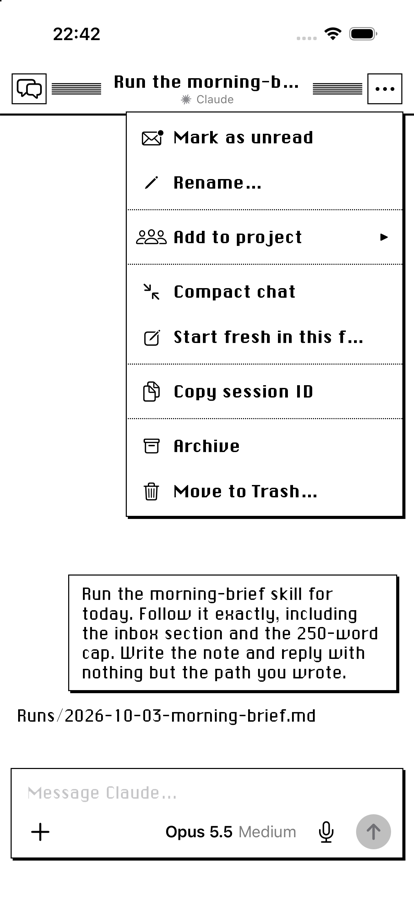
On a phone (Agentrix's iPhone app, ClassicMenu.swift, 4 Oct 2026) the same menu, sized for a finger:
| Part | Spec |
|---|---|
| Box | As above: paper, 1pt ink edge, 2pt hard shadow; up to 300pt wide (screen width − 24pt) |
| Type and rows | Chicago 16pt on rows at least 44pt tall, 14pt side padding |
| Placement | Next to the button that opened it: below it when the button is in the top half of the screen, above it in the bottom half; aligned to the button's nearer side. Scrolls if it is taller than the room |
| Pressed row | Reversed while the finger is down; the choice happens on release |
| Sections | A muted Chicago 12pt heading (Model, Effort), rows under it |
| Submenus | Open in place, replacing the list, with a back row (‹ and the submenu's name) on top and a dotted rule under it. There is no room beside the row on a phone |
| Closing | A tap outside closes it and does nothing else. A chosen action runs only after the menu has gone, so a sheet or alert it opens appears normally |
| Long-press menus | Stay the system's own (they are about the pressed thing, not the app) |
8.8 Dialog
.c84-dialog · .is-alert · .c84-dialog-message · .c84-dialog-detail · .c84-dialog-field · .c84-dialog-buttons — alerts built and run by showDialog() and showPrompt() in classic-1984.js.
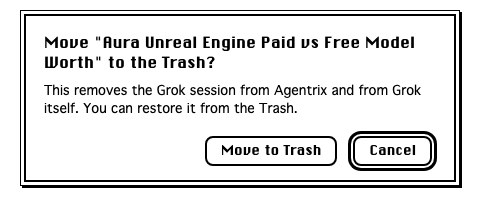
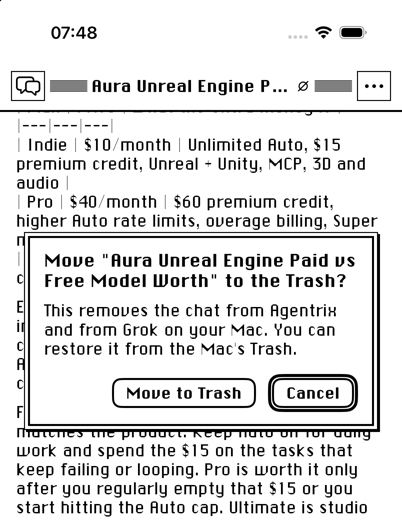
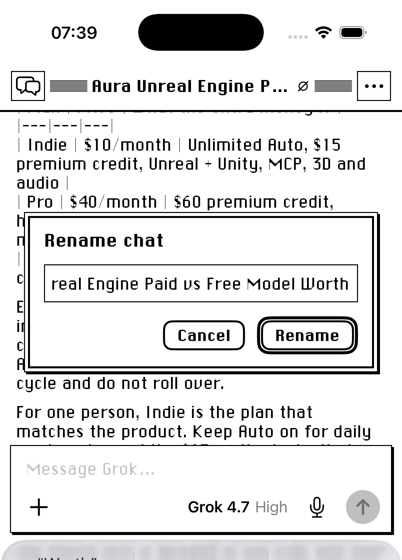
The 1984 double border: 1px ink, 3px paper, 2px ink, then the 2px hard shadow. Padding is 16px × 18px. In Ekybe, a poll inside a message is drawn as a dialog box, and the button that votes is the default button.
Alerts, confirmations and prompts. Every question the app asks (Move to Trash?, Delete?, Couldn't save…, Rename…) is this box while Classic is on. The platform's own alert is never used for them: on iOS it took Classic's fonts and tint and came out broken (the field ran past its edge, the buttons went grey), and on a Mac or in a browser it is the one modern thing left on screen (Roberto, 6 Oct 2026: "every dialog themed").
| Part | Spec |
|---|---|
| Box | .c84-dialog, 440px wide (window − 40px at most). Phone: screen − 48pt |
| Message | Chicago 15/1.35 (phone: Chicago 17pt). It says what will happen, as a question or a statement |
| Detail | Optional, under the message, 8px apart: Chicago Light 13/1.45, the consequences in one or two sentences |
| Field (prompts only) | A square .c84-field the box's width, 12px under the message, with the current value selected |
| Buttons | On the right, 12px apart, 18px under the text, at least 76px wide, labels on one line. Verbs, not Yes/No: "Move to Trash", "Delete project", "Rename" |
| Default button | Ringed (§8.5), always the rightmost. Return presses it |
| Which is default | The action, unless the action deletes or can't be undone: then Cancel is the default, so Return never deletes (Roberto, 6 Oct 2026). A prompt's default is its confirming button |
| Cancel | Esc presses it. A one-button alert's only button (OK) is both |
| Placement | Centred across, in the upper part of the window (16% down; phone: ~150–170pt from the top, so the keyboard never covers it) |
| Behind it | Nothing dims and nothing blurs. A press outside does nothing: a modal dialog waits for an answer |
| Motion | None: it appears and disappears |
| Mac | iPhone |
|---|---|
 |
  |
import { showDialog, showPrompt } from './classic-1984.js'
if (await showDialog({ message: 'Move "Notes" to the Trash?', detail: 'You can restore it from the Trash.',
                       buttons: ['Move to Trash', 'Cancel'], destructive: 0 }) === 0) trash()
const name = await showPrompt({ message: 'Rename chat', value: oldName, confirm: 'Rename' })  // string or null
Out of scope: file and folder pickers (open, save, choose folder) stay the system's own; they are whole windows with their own navigation, not questions. Long-press menus on a phone stay the system's too (§8.7).
8.9 Scroll bars
On every scrolling area, not only some:
- 14px wide, with a dithered track and a 1px ink rule on its inner edge
- the thumb is a paper box with a 1px ink border, square ends, and a minimum length of 24px
Scroll-bar parts are pseudo-elements, so a blanket radius reset doesn't reach them. Set them explicitly, as the kit does. Roberto, 3 Oct: "all scroll bars have rounded endings, original one had square endings."
8.10 Images and links
- Photos and screenshots in content get a 1px ink outline (
.c84-frame). Emoji images don't. - Links are ink and always underlined.
8.11 Notice / toast / banner
.c84-notice
Paper, 1px ink border, 2px hard shadow, Chicago 13/18. It doesn't slide in; it appears. Status is expressed in words and icons, never colour. "Notifications are off" and "Notifications are on" differ by their words and icon (a struck bell, a check), not by orange and green.
8.12 Settings panel (Appearance)
How Ekybe lays out the Classic settings, worth copying:
- Theme: a row of theme buttons. A small caption beside the heading says whether this device is phone or computer, set apart from the other.
- Message text: five buttons, each showing "Aa" at its own size with the step name under it (§11.2).
- These appear only while Classic is the theme:
- Tint: five swatches, each an "Aa" in Chicago on that preset's paper and ink.
- Hue: a slider with a rainbow track.
- Strength: a slider, captioned "From plain black and white to fully tinted."
- Night look: a checkbox, captioned "when your device is in dark mode. Glowing ink on dark paper."
- Pictures: four choices in a 2 × 2 grid, each with a label and a one-line hint (§9).
A link "Appearance settings…" in the theme menu opens the panel scrolled to this section.
9. People's pictures
Each person chooses how pictures of people are drawn. Roberto liked all four, so it is a setting rather than a ruling.
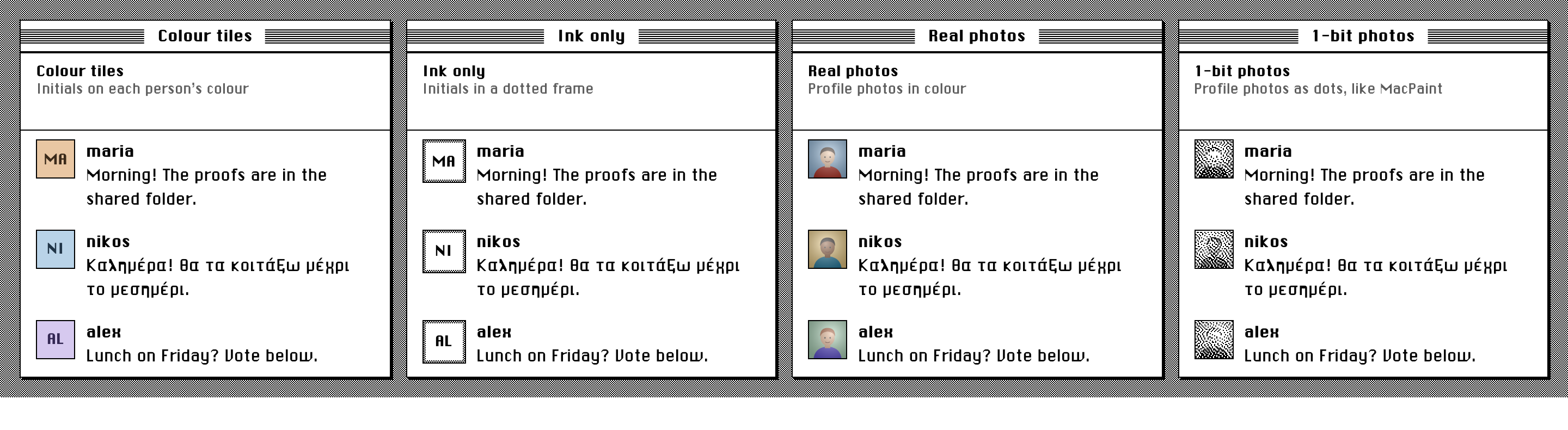
Live: pictures.html.
| Value | Label | Hint | Drawing |
|---|---|---|---|
colour |
Colour tiles | Initials on each person's colour | The person's own colour tile with initials, even if they have a photo. |
ink |
Ink only | Initials in a dotted frame | Chicago initials on paper, inside a 3px dithered frame with a 1px ink outline. Fully 1-bit. |
photo (default) |
Real photos | Profile photos in colour | The photo, cover-cropped. No photo: the person's colour tile. |
bit |
1-bit photos | Profile photos as dots, like MacPaint | The photo turned into ink dots by Atkinson dithering, at one dot per CSS pixel. No photo: ink only. |
In this kit every picture sits in a 1px ink frame (.c84-avatar). In Ekybe, pictures inside messages get it from the image-frame rule.
1-bit photos, how:
ditherMask(url, size)inclassic-1984.jsdraws the photo into asize × sizecanvas.- It converts the pixels to luminance and runs Atkinson dithering, which pushes 6/8 of each pixel's error to six neighbours. That is the MacPaint look: highlights and shadows clip clean.
- It returns a PNG data URL that works as a mask, opaque where the ink goes.
- Show it as
mask-imageon a box filled withvar(--ink), withimage-rendering: pixelated. The same mask then works in every tint and at night, without being dithered again. - Results are cached per photo and size.
- The photo must be served with CORS, or the canvas is tainted. Then the promise rejects: keep showing the plain photo.
10. Interaction and motion
- No transitions or animations. State changes are instant: hover, menus, panels, toasts.
- Panels opening and closing switch in one frame. Anything inside them drawn in its own layer (a web view, a terminal canvas, a live device mirror) is resized by the browser engine a few frames later, which left the old edge on screen for a moment in Agentrix. Hide the side's contents and its separator for the switch and show them two frames later (
requestAnimationFrametwice), once they have their new size. - Hover:
- rows get the 9% hover fill
- menu items and buttons reverse
- icon buttons don't change
- Pressed: reversed. The close box shows its star.
- Hover-to-open menus (the zoom box) wait 450ms before opening and 250ms before closing, so passing over them does nothing.
- Menus follow the pointer and the keyboard as described in §8.7.
- Focus: a 1px dotted ink outline, offset 2px (inset 3px inside fields). This is an addition; 1984 had no visible keyboard focus.
- Cursor:
defaultover chrome: bars, boxes, menu items, buttons. Text cursor in fields only. - Text selection: reversed (ink background, paper text).
11. Settings a person can change
11.1 Classic preferences
Stored as one JSON object:
{ "hue": 135, "strength": 0, "night": true, "avatars": "photo" }
| Key | Range | Default |
|---|---|---|
hue |
0–359, integer | 135 (only matters once strength > 0) |
strength |
0–100, integer | 0 (black and white) |
night |
boolean | true |
avatars |
colour · ink · photo · bit |
photo |
Always pass stored values through normalizeClassic(); it clamps and fills in defaults.
11.2 Message text size
Five steps, stored as an integer from −2 to 2. The setting changes message text and the composer only; names, sidebar and menus stay put.
| Step | Label | Scale | Body size |
|---|---|---|---|
| −2 | Smaller | 0.86 | 12.5px |
| −1 | Small | 0.93 | 13.5px |
| 0 | Default | 1 | 14.5px |
| 1 | Large | 1.15 | 16.7px |
| 2 | Largest | 1.32 | 19.1px |
- How it applies: as
--c84-text-scale(Ekybe:--text-scale). Body size iscalc(14.5px * scale), and line height is unitless so it follows. - On phones: the composer never goes below 16px. iOS zooms the page into any field smaller than that.
11.3 Per device, per account
Ekybe keeps separate values for phones and for computers, for the theme, the Classic preferences and the text size alike (Roberto: Classic on the Mac without the phone following).
- Locally: cache them in separate keys (
…_touch), so the first paint is already right. - On the account: store them in separate columns (
theme/theme_mobile,classic_prefs/classic_prefs_mobile,text_size/text_size_mobile). Other devices of the same kind adopt a change live. - Device kind: decided once per session by
matchMedia('(pointer: coarse)'). - Never chosen is stored as null, and the app keeps its default.
12. Platforms
12.1 Mac desktop app (Tauri)
The native title bar must go entirely; hiding parts of it does not work. Ekybe draws its own 28px bar (§8.1) and turns the window's decorations off.
- Use the framework's switch:
getCurrentWindow().setDecorations(false). Don't hand-set AppKit style masks: the windowing layer undid them, and the macOS bar stayed (Ekybe 1.0.524). - Calls race. Tauri runs window setters as async commands in parallel, so a "decorations on" from the first render can land after the "off". Queue the calls so only one runs at a time.
- The window remembers what it was told, not what it shows, and skips a call that matches. If the bar returns by any other route (leaving a full screen entered from the system menu restores the full-screen style), "off" becomes a no-op for ever. Always send on, then off, and send it again whenever the window leaves full screen. Ekybe 1.0.541 fixed exactly this.
- Push the app down under the bar:
- Give
#roota 28px top margin andheight: calc(100% - 28px). - Give it
transform: translateZ(0), soposition: fixedoverlays measure from#rootrather than the window. - Portal the bar itself into
<body>, outside#root.
- Give
- Required capabilities:
core:window:allow-set-decorationsallow-start-draggingallow-close,allow-minimizeallow-set-fullscreen,allow-is-fullscreenallow-set-size,allow-set-position,allow-outer-size,allow-outer-positionallow-current-monitor,allow-center
- Other themes get the native bar back.
Reference: Ekybe src/components/ClassicTitleBar.tsx.
12.1b Mac desktop app (Electron)
Agentrix does the same in Electron (src/main.js, renderer/classic.css):
- No frame:
new BrowserWindow({ frame: false, roundedCorners: false })in Classic. A frame can't change at runtime, so switching into or out of Classic reopens the window in place (same bounds), with the native frame back in the other themes. - Full screen:
roundedCorners: falsemakes Electron treat the window as not fullscreenable, sosetFullScreen(true)silently does nothing (the zoom box did nothing until 5 Oct 2026). UsesetSimpleFullScreen()for these windows: it covers the screen in place, without a new Space. Framed windows keepsetFullScreen(). - Tiling (the zoom box's menu):
screen.getDisplayMatching(win.getBounds()).workArea, thensetBounds; lowersetMinimumSizewhile tiled and restore it with the previous bounds. - Drag region: the bar is
-webkit-app-region: drag; the boxes, buttons and any menu or dialog drawn over it areno-drag, or they can't be clicked. - Menus and dialogs are drawn by the page, because macOS draws its own and they can't be themed. The main process keeps one function for each, taking Electron's own shapes:
popup(template)→ in Classic, a plain copy of the template (labels, ticks, icons as data URLs) is sent to the window, which draws it withshowMenu-style code and sends back the chosen id; in the other themes,Menu.buildFromTemplate(template).popup().messageBox(options)→ in Classic,{ message, detail, buttons, defaultId, cancelId }is sent to the window, which draws the dialog (§8.8) and answers with the button's index, as{ response }; in the other themes,dialog.showMessageBox(win, options). If the window closes first, the answer is the cancel button.- The page's own questions go through the same path (an IPC call into
messageBox), neverconfirm()oralert(), which are plain browser pop-ups that can't be styled. - Text fields' Cut / Copy / Paste menu stays native (roles).
12.2 Browser
No window bar of our own: the browser has its chrome. Pane headers keep their 9px stripe band. Scroll-bar styling is WebKit/Blink only; Firefox shows its own thin bars, coloured by color-scheme.
12.3 iPhone and Android (Capacitor web view)
- The fonts must be in the app bundle; Capacitor copies
public/fonts. - Fields are at least 16px, or iOS zooms on focus.
- Pane headers keep the stripe band. There is no window bar.
12.4 Native iOS (SwiftUI)
Agentrix's iPhone app implements the same system natively in ios/AgentDeck/Classic.swift. It is the reference for a SwiftUI port.
| Web | SwiftUI (Agentrix) |
|---|---|
classicColors() |
Look.colors(hue:strength:dark:) — the same formula |
--ink, --paper |
Color extensions reading Look.shared |
| Chicago, Chicago Light | Font.chicago(_:), the bundled TTFs in UIAppFonts |
.c84-window + shadow |
ClassicBox / .box(_:_:shadow:) |
.c84-dialog |
DialogBox |
| Stripes | Stripes, StripedTitle |
| Buttons | ClassicButtonStyle, ProminentButton |
| Lists, bars | ClassicList, ClassicBar |
showMenu(), .c84-menu |
AppMenu with MenuEntry data (ClassicMenu.swift): iOS's Menu in the other looks, the 1984 menu in Classic, from one definition |
| Pane separator | A 1pt ink line, full height (the drawer's edge in DrawerView.swift) |
showDialog(), showPrompt() |
.classicDialog(_:isPresented:message:sheet:buttons:) with DialogButtons, and .textPrompt(_:isPresented:text:confirm:): iOS's alert or action sheet in the other looks, the 1984 box in Classic, from one call |
Presenting over everything. Menus and dialogs are a fullScreenCover with .presentationBackground(.clear) and animations off (Transaction.disablesAnimations), so they also work inside sheets and appear at once. Two things learned the hard way (Agentrix, 5–6 Oct 2026):
- Hand the cover what it needs at the moment of the tap: use
fullScreenCover(item:)with an item carrying the button's frame and the menu's entries. The cover's content is built from an earlier copy of the view, so reading the frame from@Statethere gave.zero, and a menu opened from a screen that had just slid in appeared in the top-left corner. - Track the button's frame with
onGeometryChange(for: CGRect.self) { $0.frame(in: .global) }, not aGeometryReaderwithonChange: the reader only re-runs when its own size changes, so moves (a drawer closing, a launch) leave a stale frame. - Run the chosen action in
onDismiss, after the cover has gone, so a sheet or another dialog it opens can appear.
Register fonts by PostScript name. Agentrix uses ChicagoFLF and ChicagoFLF-Light. This kit's files are ChicagoFLF-Greek (display) and ChicagoFLF-Light (text, now with Greek); swap them in to get Greek natively too.
13. Re-skinning an existing app
This is how Ekybe added Classic as a sixth theme without rewriting its components. It is useful when the app already has design tokens.
Scope everything to
:root[data-theme='classic'], so other themes are untouched.Map the app's existing tokens to ink and paper. Ekybe's mapping:
--bg: var(--paper);  --sb: var(--paper);  --card: var(--paper);
--line: var(--ink);  --tx: var(--ink);    --ac: var(--ink);
--mut: color-mix(in srgb, var(--ink) 64%, var(--paper));
--acs: color-mix(in srgb, var(--ink) 12%, var(--paper));
--hov: color-mix(in srgb, var(--ink) 9%, var(--paper));
--unread: var(--ink);  --unread-tx: var(--paper);
--p-active: var(--ink); --p-away: color-mix(in srgb, var(--ink) 50%, var(--paper)); --p-off: var(--paper);
--bad: var(--ink);  --send-bg: var(--paper);  --send-fg: var(--ink);
--radius: 0px;  --shadow: 2px 2px 0 var(--ink);  --shadow-sm: 1px 1px 0 var(--ink);
--serif: 'Chicago', …;  --font: 'Chicago Light', …;  --mono: Monaco, …;
Square everything with one blanket rule. Most radii in a React app are inline numbers no token reaches:
:root[data-theme='classic'] *, …::before, …::after { border-radius: 0 !important; text-shadow: none !important; }Then bring back the round exceptions (§6.1) with
!importanttoo.Re-map inline white. Apps write
color: #ffffor text on the accent, and React serialises it asrgb(255, 255, 255)::root[data-theme='classic'] [style*='color: rgb(255, 255, 255)'] { color: var(--paper) !important; }Hook components with marker classes, not new components. Ekybe added classes such as:
cf-titlebar(pane headers)cf-navrow-on(selected row)cf-emit-send(default button)cf-send(disabled send)cf-dialog(poll)cf-display(titles)cf-dot,cf-emit-unreadcf-av-ink,cf-av-bit(pictures)cf-msg(message, for image frames and links)cf-chrome(Mac bar present)
They do nothing in other themes.
Set the two colours from script on
<html>. Cache the prefs locally, so the first paint uses the right ink before the account loads.Pictures: route every avatar through one component that reads the picture style from a tiny store. Ekybe draws Avatar in 19 places, so this is a store rather than a prop.
14. Accessibility
- Contrast:
- Black and white is the maximum possible (21:1).
- At strength 100, day ink (lightness 15%) on day paper (91%) and night ink (68%) on night paper (6%) both stay well above WCAG AA for body text.
- Muted text (64% ink) passes AA for the 11–13px meta sizes in black and white. Check it if you change the recipe.
- Colour is never the only signal. This holds by construction, because there